Reading a ZPA ZE314 electricity meter with ESPHome
In this article
For a while I'd wanted to know how much electricity our house uses. Partly because we have an electric boiler that heats both the hot water and the underfloor heating, and partly because I enjoy having everything in Home Assistant and watching it over time. The main distribution board holds a ZPA ZE314 meter owned by the distributor – three-phase and dual-tariff. There is no socket nearby, so the choice fell on an ESP32 running on a battery.
The result: an ESP32-C3 with an optical head reads the meter every 30 minutes, checks the values and sends them to Home Assistant. Below are the protocol, the data the meter returns, the problems I ran into, the wiring and the firmware.
First step: Python on a laptop
First I had to work out how to get data out of the meter at all. I'd had enough of writing the reading down on paper once a month (when I didn't forget). The ZE314 has an optical port per IEC 62056-21, which a read head attaches to with a magnet – and I found an old one in my box of parts.
I hooked it up to a laptop and started reading data in Python. That produced a script, meter_read.py, and a shell script, capture.sh, which runs it repeatedly and saves the readings to JSON:
meter_read.py -p /dev/cu.usbserial-XXX               # leading registers, 0.18 s
meter_read.py -p /dev/cu.usbserial-XXX --mode full   # all 183 registers, with BCC check
meter_read.py -p /dev/cu.usbserial-XXX --listen 60   # listen only, send nothing
capture.sh 30 /dev/cu.usbserial-XXX 5 full "notes"   # series of reads to JSON for regression tests
Later came a meter simulator, meter_sim.py. It runs on a PC, replays a real capture and can fail on purpose: missing or truncated identification, a truncated block, part of the block dropping out, a bad checksum (BCC), mismatched tariffs, a decreasing or jumping total. A real meter won't fail on request, so without the simulator the firmware's error paths would never get tested. Each of these failures must end with nothing sent to Home Assistant.
Optical port and IEC 62056-21
The meter talks in mode C with a text readout, always 7 data bits, even parity and 1 stop bit (7E1). The exchange goes like this:
| Step | Direction | Bytes | Rate |
|---|---|---|---|
| 1 | → meter | /?!\r\n | 300 Bd |
| 2 | ← meter | /ZPA5ZE314.v61_012\r\n | 300 Bd |
| 3 | → meter | 06 30 35 30 0D 0A (ACK, V=0 Z=5 Y=0) | 300 Bd |
| 4 | – | wait ~200 ms, switch the port | – |
| 5 | ← meter | STX <lines> ! CR LF ETX BCC | 9600 Bd |
The fifth character of the identification (5) says the meter can do 9600 Bd. An ACK with Z=5 confirms that rate, and Y=0 requests a readout only; Y=1 (programming mode) is never sent. The readout is 4656 characters: 4.85 s at 9600 Bd, 155 s at 300 Bd.
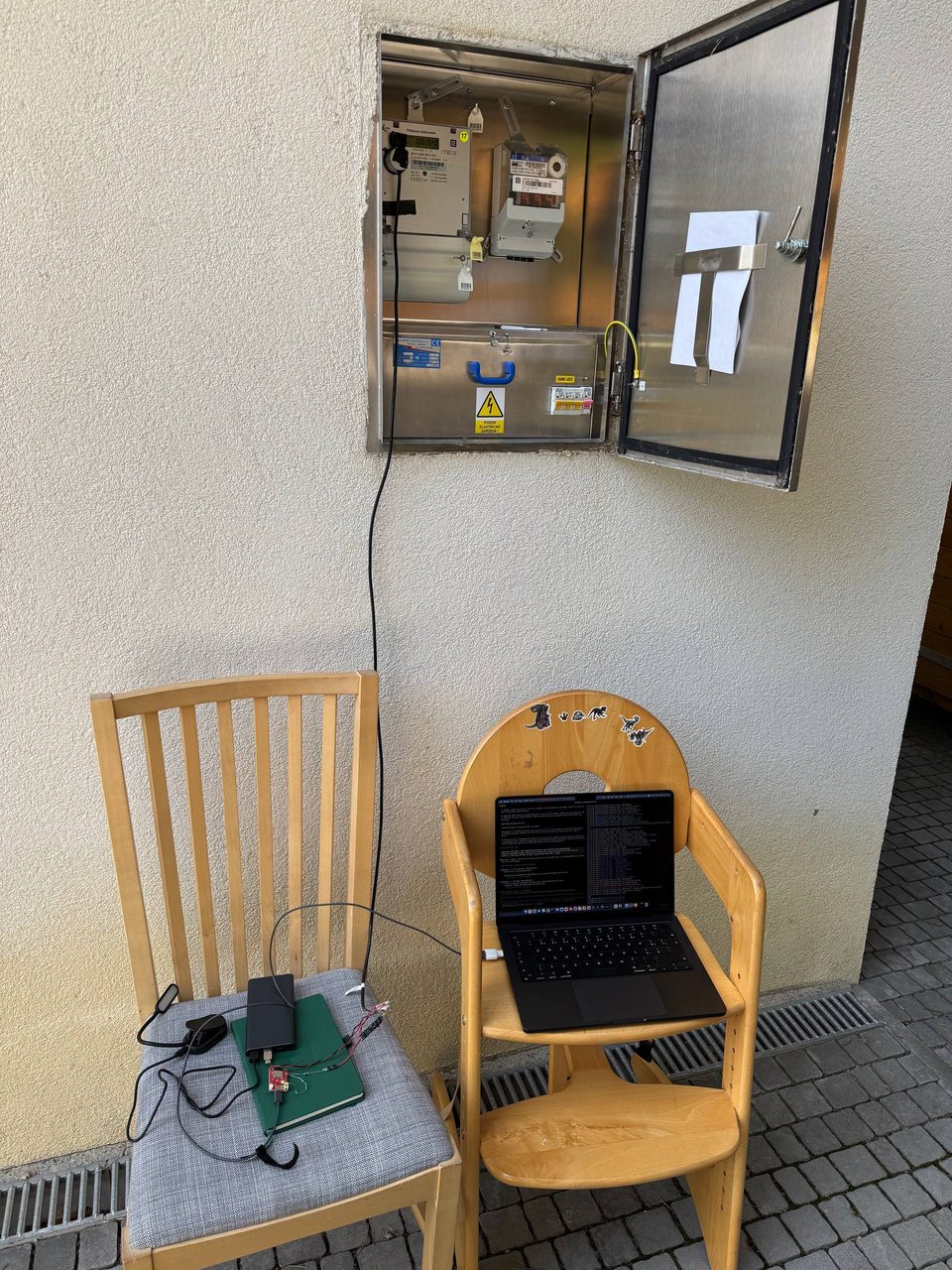
First snag: after switching to 9600 Bd I flushed the input buffer and lost the STX, the start of the readout. The echo of my own request has to be drained while still at 300 Bd.
What the meter returns
The reply has 183 registers: 33 current values and 150 monthly history snapshots. This is a shortened real readout from 14 August 2026; I masked the serial number and device address, and […] marks omitted lines.
/ZPA5ZE314.v61_012
<STX>
C.1.0(XXXXXXXXXX)
0.0.0(XXXXXXXXXXXXXXXX)
0.3.0(10000*imp/kWh)
0.3.3(00100*imp/kWh)
F.F(000000)
1.8.0(0086889.849*kWh)
1.8.1(0023133.294*kWh)
1.8.2(0063756.555*kWh)
1.8.1-01(0023099.738*kWh)
1.8.1-02(0023053.068*kWh)
[…]
21.8.0(0029055.427*kWh)
41.8.0(0030171.146*kWh)
61.8.0(0027663.275*kWh)
2.8.0(0000001.030*kWh)
[…]
1.6.1(0009.03*kW,2608060930)
1.6.2(0010.53*kW,2608091130)
[…]
C.8.1(02812801)
C.8.2(04986131)
C.8.0(07319723)
C.82.0(00000548)
C.7.1(00000011)
C.7.2(00000007)
C.7.3(00000162)
[…]
0.2.1(ver.01, 160719, 4AE1)
C.2.1(1705271747)
C.2.9(2608141841)
0.9.2(260814)
0.9.1(184330)
C.51.15(0000000000)
[…]
C.6.0(0003242147)
C.6.3(3.65V)
!
<ETX><BCC>
What the individual lines (OBIS codes) mean:
| OBIS | Sample value | Meaning |
|---|---|---|
C.1.0 | (masked) | meter serial number |
F.F | 000000 | fatal error status, 0 = healthy |
1.8.0 | 86,889.849 kWh | total import (A+) |
1.8.1 | 23,133.294 kWh | import in tariff T1 |
1.8.2 | 63,756.555 kWh | import in tariff T2 |
21.8.0 / 41.8.0 / 61.8.0 | 29,055 / 30,171 / 27,663 kWh | import per phase L1 / L2 / L3 |
2.8.0 | 1.030 kWh | export to the grid (A−) |
1.6.1 / 1.6.2 | 9.03 / 10.53 kW | maximum demand T1 / T2 with time YYMMDDhhmm |
C.8.1 / C.8.2 | 02812801 / 04986131 | operating time of tariff T1 / T2 (format below) |
C.7.1 – C.7.3 | 11 / 7 / 162 | phase failure counts |
0.9.1 / 0.9.2 | 18:43:30 / 26-08-14 | meter time and date |
C.6.3 | 3.65 V | backup battery voltage |
This meter sends no instantaneous power, voltage or current; Home Assistant derives power from 1.8.0. Everything I need arrives in the first 0.18 s; the rest of the readout is history.
Data problems
Most of the work went into blocks that look fine at first glance but aren't.
The optics fail in two ways. At 300 Bd the identification is occasionally missing or truncated; asking again helps. At 9600 Bd a contiguous span of the block occasionally drops out, always 0.24–0.80 s from the start. The eight registers the firmware uses arrive within 0.18 s, so they stayed intact in all 45 recorded samples.
BCC is not enough. The BCC checksum is just a 7-bit XOR, and it once passed a block missing more than a third of its registers. So I also check that 1.8.0 == 1.8.1 + 1.8.2 holds (it did to 1 mWh in 45 of 45 samples), that 1.8.0 never decreases and that it doesn't grow by more than a set maximum between two reads.
ESPHome works in float32. At 87 MWh the smallest float32 step is about 7.81 Wh, so the firmware's tolerance on the tariff sum is 0.020 kWh instead of the 1 mWh used in Python.
C.8.x are not seconds but hours * 100 + minutes. So I convert them to minutes before subtracting; otherwise an hour rollover would give 41 instead of 1 minute:
minutes = floor(v / 100) * 60 + (v mod 100)Hardware
I wanted to use as many parts as I already had at home and buy nothing. The result is a bodge made of an RS485 optical head, a MAX485 module, a LaskaKit ESP32-C3-LPKit v3.2 board, an MT3608 DC-DC converter and a Li-ion cell. It's soldered together not very neatly and partly free-wired, but it works.
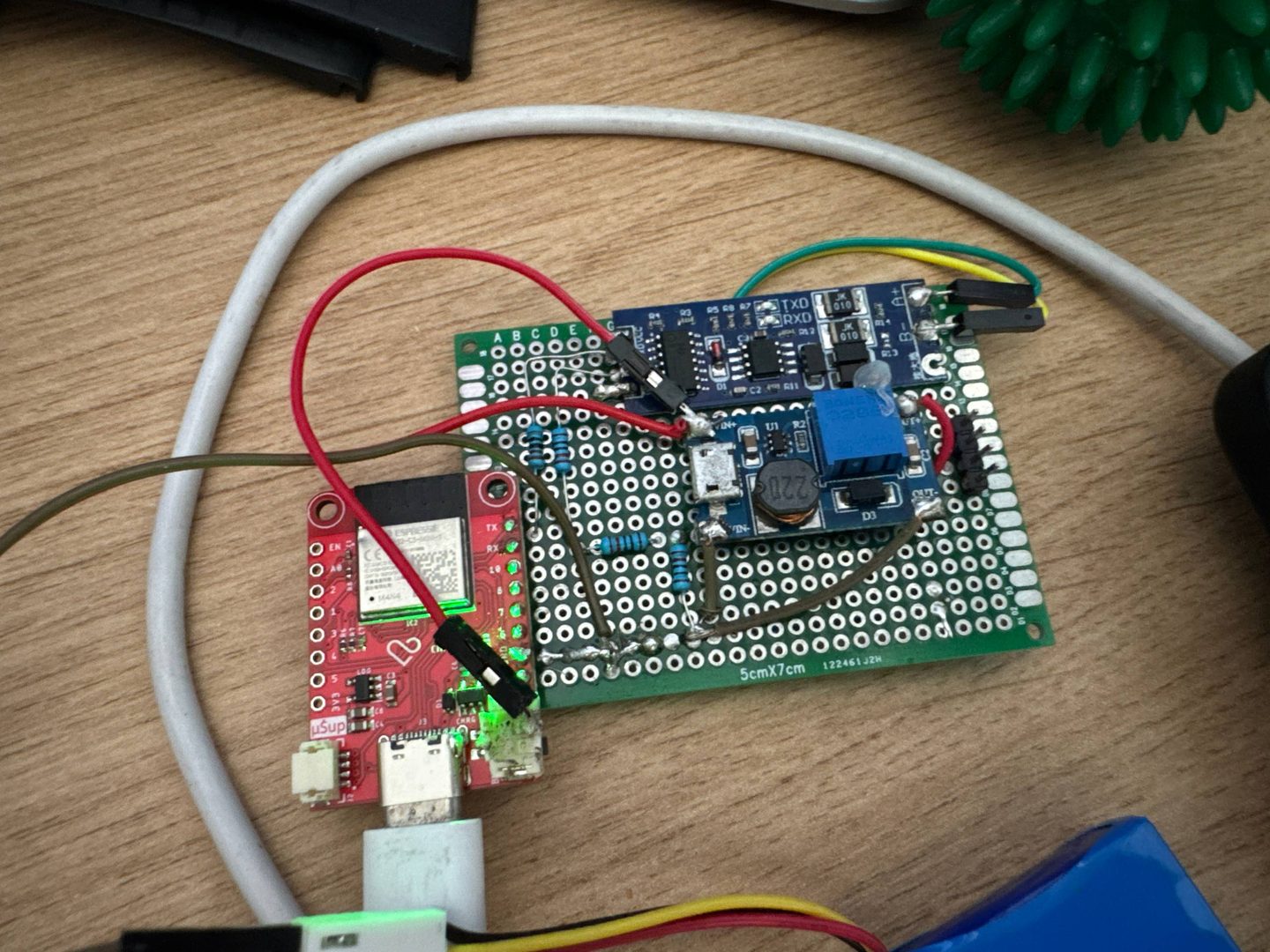
Power took the most work, because there is no socket near the meter. I started with four alkaline D cells, considered Li-SOCl2 and 18650, and ended up with a Li-ion cell from my parts box – left over from an old e-ink display project.
What I ran into along the way:
- The MAX485 module switches direction on its own (a CD4069 derives it from TXD), so the firmware has no
flow_control_pin. - The module uses 5 V logic, the ESP32-C3 3.3 V. So RX goes through a 10k/20k divider and TX through a 1k resistor.
- The meter stayed silent on the first run with ESPHome. The
A+/B-labels are not consistent, so the first thing to try is swapping A and B. - Brownout resets. Without a capacitor on the DC-DC converter input, the ESP32 kept resetting. Adding 220 µF and soldering the ground instead of running it through a breadboard made the resets go away and also made the battery voltage reading more accurate.
- ROM banner. After every wake from deep sleep the ESP32-C3 printed its ROM banner on GPIO21, which is the TX line to the head, so the meter received it too. I now disable it with
esp_deep_sleep_disable_rom_logging().
The cabinet is metal, and with the door closed the daily median WiFi signal is −76 to −78 dBm, −82 dBm at worst. Surprisingly that's enough; the WiFi connection hasn't timed out once so far. For the permanent build I still want to run the antenna outside.
ESPHome firmware
The firmware is ESPHome with the esphome-iec62056 component by aquaticus, pinned to a specific tested commit. The core of the configuration:
uart:
  id: uart_bus
  tx_pin: GPIO21    # to module TXD through 1k
  rx_pin: GPIO20    # from module RXD through a 10k/20k divider
  baud_rate: 300    # handshake, the component then switches to 9600
  data_bits: 7
  parity: EVEN
  stop_bits: 1      # no flow_control_pin, the module switches direction itself

external_components:
  - source: github://aquaticus/esphome-iec62056@994a88edb7121e61f356f3ca4aff5c21179bffb1
    components: [iec62056]

iec62056:
  id: meter_reader
  uart_id: uart_bus
  update_interval: never   # a script starts the read after wake-up
  baud_rate_max: 9600
  retry_delay: 4s          # the default 15 s is needlessly long on battery
  retry_counter_max: 1
  receive_timeout: 3s

sensor:
  - platform: iec62056
    id: raw_total_energy
    obis: "1.8.0"          # exactly as in the readout, no 1-0: prefix
    internal: true
  # 1.8.1 and 1.8.2 the same way
  - platform: iec62056
    id: raw_op_time_t1
    obis: "C.8.1"
    internal: true
    filters:
      - lambda: |-
          const float hhmm = roundf(x);
          return floorf(hhmm / 100.0f) * 60.0f + fmodf(hhmm, 100.0f);
The raw values are internal. They reach Home Assistant only through template sensors, and only once they pass the checks. One cycle looks like this:
- Wake with WiFi off, power the head and allow 250 ms to settle.
- Read, with one extra attempt on failure.
- Check
1.8.0,1.8.1and1.8.2. If anything doesn't match, nothing is published. - WiFi turns on only after a successful read: at most 12 s to join the network and 20 s for the connection to Home Assistant (API).
- Publish all values at once.
- Deep sleep for 30 minutes. If the cycle takes over 60 s, a failsafe ends it without publishing.
The component keeps old values between reads, so the firmware invalidates them before each read. On the extra attempt it also drops to 4800 Bd; the readout itself then takes about 9.7 s and the whole cycle around 19 s.
The firmware stores the last accepted 1.8.0 in NVS (persistent flash storage) so it can check that the total never decreases. NVS also holds counters of each wake's outcome (published, timeout, rejected, brownout), so every gap in the graph has an explanation.
Those counters found the most interesting bug: wakes alternated, one published and the next ended with an API timeout. The aioesphomeapi library that Home Assistant connects through retries sleeping devices with a backoff of up to 15 s. The node, however, waited only 8 s and also had WiFi power saving on. After raising the wait to 20 s and turning power saving off, the node counted 61 publishes out of 61 wakes overnight – but Home Assistant received only 60. The node counted a publish as soon as it accepted the connection, before the encrypted handshake, and went to sleep half a second later; whether that caused the missing snapshot I haven't proven. It now waits until Home Assistant subscribes to its states, and only that counts as a publish.
For OTA updates the node has a Prevent Deep Sleep switch that keeps it awake. Every automatic path into deep sleep has to respect it.
Home Assistant
The node is added to Home Assistant through the ESPHome integration. It publishes 1.8.0, 1.8.1, 1.8.2, the active tariff, T1 and T2 minutes per cycle, the meter time, the F.F status, WiFi signal strength and battery voltage. Home Assistant keeps the last values while the node sleeps.
On the dashboard I have cards with today's consumption in T1 and T2:
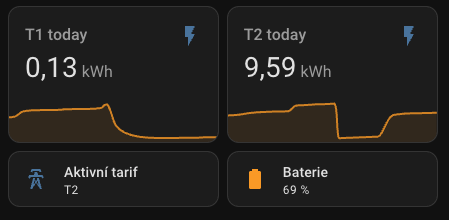
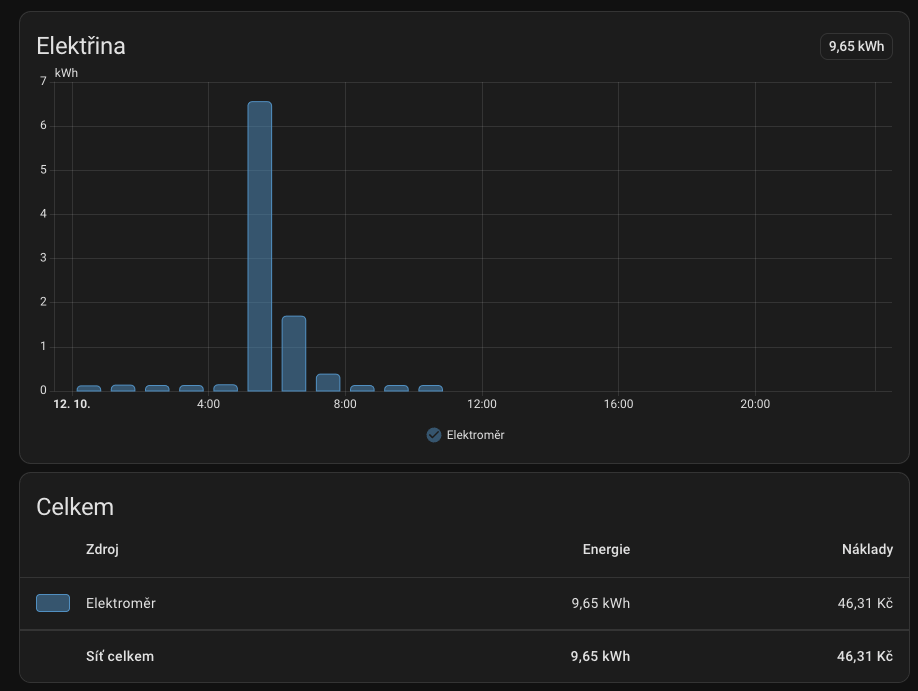
The Energy dashboard has only 1.8.0 set as grid consumption. The tariff sensors add up to the same energy, so including them would count consumption twice.
Tariff switch time
The meter doesn't send which tariff is running or when it switched. It only sends the C.8.1 and C.8.2 counters: how long T1 and T2 have run in total. Only one of them grows at any moment, even with no load, when an hour's energy might not show up in float32 at all. From their increase per cycle, the firmware publishes Active Tariff, the tariff that ran longer during the cycle.
So for now the tariff history in Home Assistant doesn't match reality. An example from the evening of 10 October (CEST, Home Assistant publish times):
| Cycle | T1 increase | T2 increase | Actual switch | Active Tariff |
|---|---|---|---|---|
| 21:31:47 – 22:01:46 | 13 min | 17 min | T2 → T1 at 21:48:46 | T2 |
| 22:31:45 – 23:01:44 | 17 min | 13 min | T1 → T2 at 22:48:44 | T1 |
T1 ran for exactly one hour, but Home Assistant shows it only from the next wake at 22:31 and switches back to T2 only around 23:31. The tariff graph is off by more than 40 minutes.
Yet the counters give the switch time to the minute. In a cycle with a switch, both grow, and the switch happened at the publish time minus the new tariff's minutes: 22:01:46 − 13 min = 21:48:46. That is why the firmware already publishes T1 Minutes This Cycle and T2 Minutes This Cycle, and the switch time can be worked out by hand from the history.
The tariff isn't switched by the meter's clock but by the distributor's ripple control (HDO). Four days in a row the schedule was the same: T1 at 8:48–9:48, 11:48–12:48, 16:48–17:48 and 21:48–22:48, T2 otherwise, every switch within a minute of :48:45. The meter clock (0.9.1) runs about 4 minutes fast, so at that moment it shows around :52:50.
The plan is my own IEC component that, in a cycle with a switch, sends the minutes since the switch, and Home Assistant computes the exact time from the publish time. For the current tariff, I want Home Assistant to follow the distributor's HDO schedule, with the meter only confirming it.
Current state
The node runs on battery in the closed cabinet, and since 11 October a one-week test has been running at a 30-minute interval. By 15 October, 190 of 190 cycles had reached Home Assistant; I haven't evaluated the full week yet. Earlier tests passed 60 of 60 cycles at a 10-minute interval and 24 of 24 overnight at 30 minutes, without a single invalid value in Home Assistant.
Next I want to turn the bodge into a permanent build with the antenna outside the cabinet and replace the upstream component with my own. I'm not quoting battery life yet; I'll measure it on the finished assembly.